> ## Documentation Index
> Fetch the complete documentation index at: https://documentation.slotify.com.tr/llms.txt
> Use this file to discover all available pages before exploring further.

# Services

> Define single and group (session) services

# <span className="s-hero">Services</span>

Manage the services your customers book here.

<Info>📱 🧭 **Menu:** **My Business → My Services**</Info>

<Steps>
  <Step title="View your services">
    <Frame>
      <img src="https://mintcdn.com/codevestllc-5d6f3ede/YKrZiftlDEtllZar/images/16.png?fit=max&auto=format&n=YKrZiftlDEtllZar&q=85&s=6854863b37696bbe346c1714055b0eb3" alt="Service list" width="1080" height="1350" data-path="images/16.png" />
    </Frame>

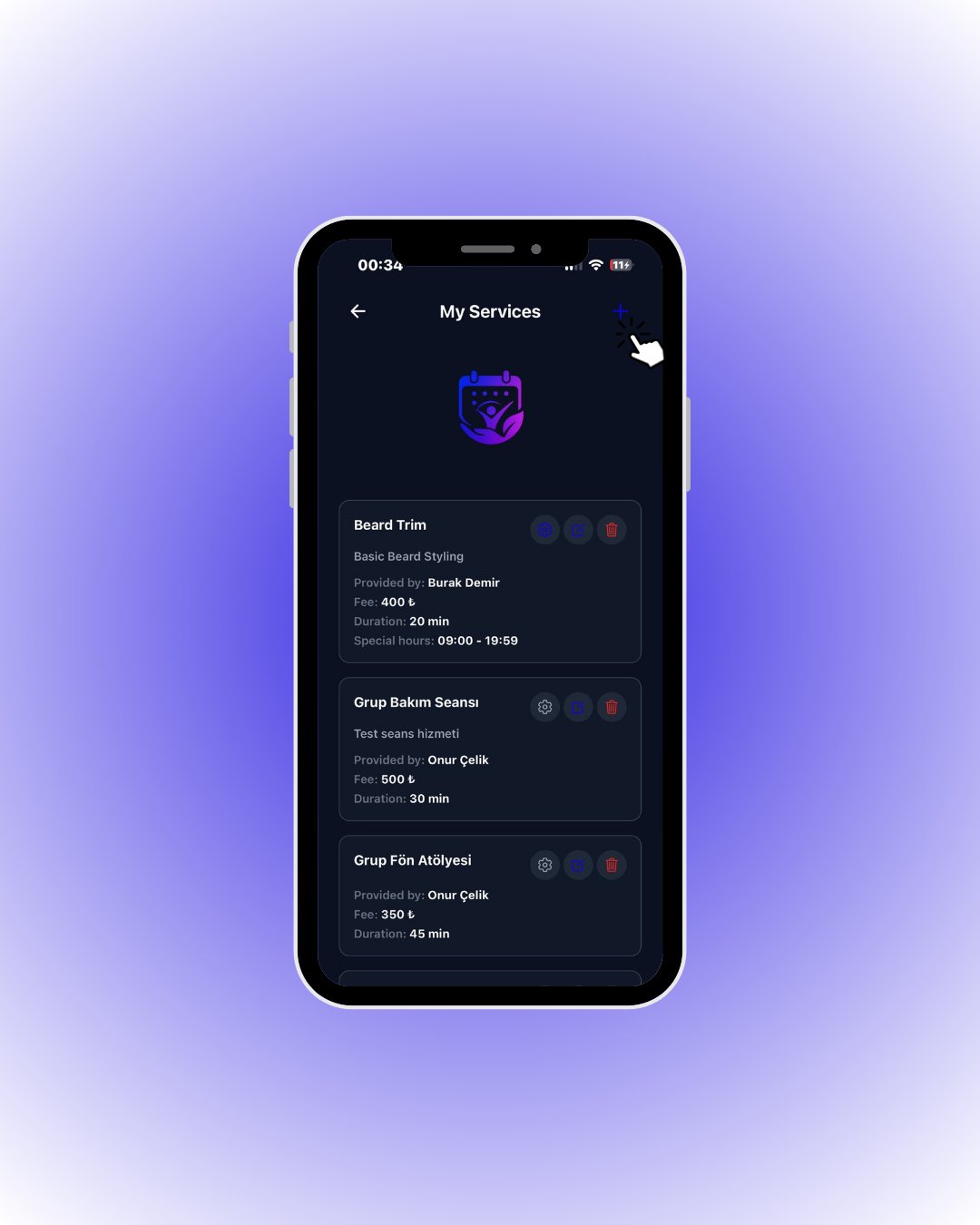
    Each card shows the fee, duration, provider and special hours if any.

    <div className="s-action">Tap the **+** button in the top right to add a service.</div>
  </Step>

  <Step title="Add a service">
    <Frame>
      <img src="https://mintcdn.com/codevestllc-5d6f3ede/YKrZiftlDEtllZar/images/11.png?fit=max&auto=format&n=YKrZiftlDEtllZar&q=85&s=034046af1838ca5d4e605f1085f7f90c" alt="Add service" width="1080" height="1350" data-path="images/11.png" />
    </Frame>

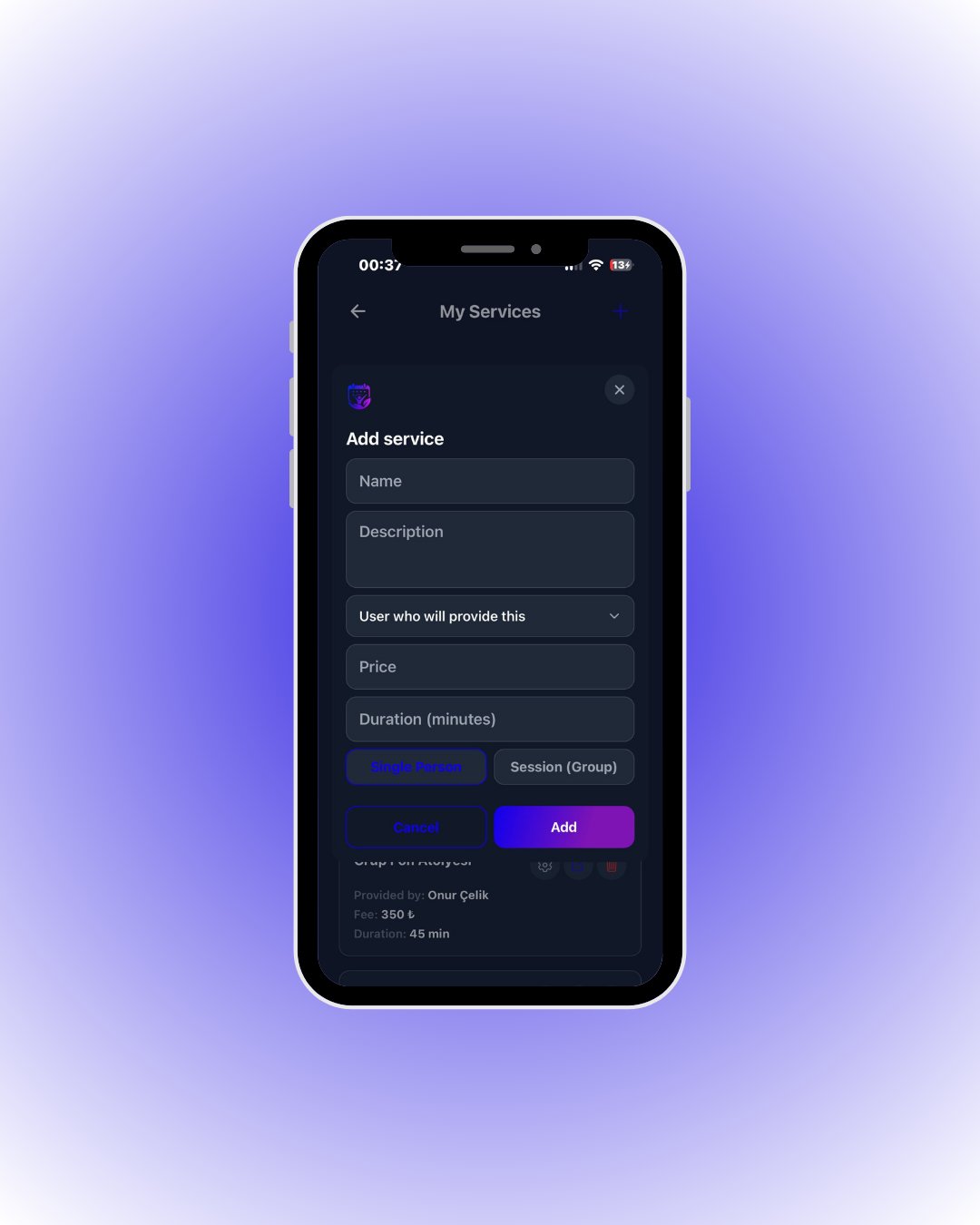
    Enter the name, description, provider, price and duration. **Single Person** is the classic one-on-one service; **Session (Group)** takes multiple customers in the same slot with a capacity — think pilates classes.

    <div className="s-action">Fill it in and tap **Add**.</div>

    <Accordion title="🔎 Every field in the service form">
      | Field / Element                | What it means                                                                                                                                                                                                         |
      | ------------------------------ | --------------------------------------------------------------------------------------------------------------------------------------------------------------------------------------------------------------------- |
      | **Name**                       | Service name (e.g. *Haircut*) — shown to customers.                                                                                                                                                                   |
      | **Description**                | Short description customers see on the card (optional).                                                                                                                                                               |
      | **User who will provide this** | The expert delivering it. Slots are computed from this expert’s hours and availability.                                                                                                                               |
      | **Price**                      | Service fee. Totals are calculated automatically when multiple services are picked.                                                                                                                                   |
      | **Duration (minutes)**         | Service length; slot occupancy is calculated from it.                                                                                                                                                                 |
      | **Single Person**              | **One-on-one** service: a slot takes exactly one customer and then closes.                                                                                                                                            |
      | **Session (Group)**            | **Group session**: multiple customers can book the same slot up to a capacity (think pilates). Selecting it reveals a **capacity** field — the max attendees per session; the slot closes only when capacity is full. |
    </Accordion>
  </Step>

  <Step title="Special hours (optional)">
    <Frame>
      <img src="https://mintcdn.com/codevestllc-5d6f3ede/YKrZiftlDEtllZar/images/21.png?fit=max&auto=format&n=YKrZiftlDEtllZar&q=85&s=47b62572e1672b01aa1a017e581e5d39" alt="Special working hours" width="1080" height="1350" data-path="images/21.png" />
    </Frame>

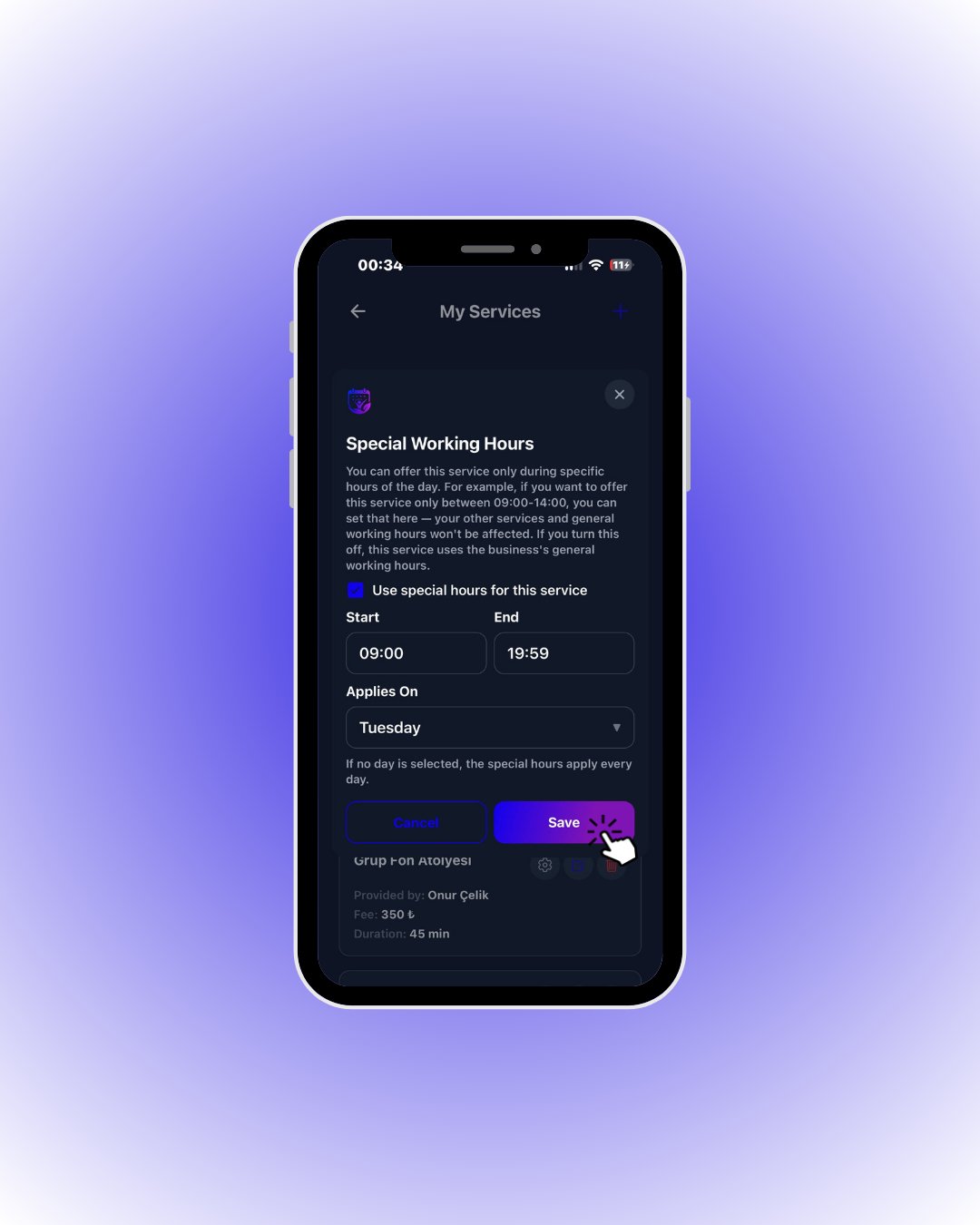
    To offer a service only during part of the day (e.g. 09:00–14:00), open this window from the ⚙️ icon on the service card; your general hours stay untouched.

    <div className="s-action">Tick **Use special hours for this service**, pick the times and day, then tap **Save**.</div>

    <Accordion title="🔎 Special-hours rules">
      | Field / Element                        | What it means                                                                                                          |
      | -------------------------------------- | ---------------------------------------------------------------------------------------------------------------------- |
      | **Use special hours for this service** | While ticked, the service is bookable only inside the window below; untick to fall back to your general working hours. |
      | **Start / End**                        | The window this service can be booked in (e.g. 09:00 – 14:00). General hours and other services are unaffected.        |
      | **Applies On**                         | The day the window applies to. **If no day is selected, it applies every day.**                                        |
      | **“Special hours” line on the card**   | Services with a window show it on their card (e.g. 09:00 – 19:59).                                                     |
    </Accordion>
  </Step>
</Steps>