> ## Documentation Index
> Fetch the complete documentation index at: https://documentation.slotify.com.tr/llms.txt
> Use this file to discover all available pages before exploring further.

# Working Hours & Reservation Settings

> Hours and booking rules on one page

# <span className="s-hero">Working Hours & Reservation Settings</span>

On the web panel, working hours and reservation settings are managed **on the same page**.

<Info>🌐 **URL:** [`https://admin.slotify.com.tr/working-hours`](https://admin.slotify.com.tr/working-hours) · 🧭 **Menu:** **Booking Management → Working Hours**</Info>

<Steps>
  <Step title="Weekly hours table">
    <Frame>
      <img src="https://mintcdn.com/codevestllc-5d6f3ede/YKrZiftlDEtllZar/images/web/4.png?fit=max&auto=format&n=YKrZiftlDEtllZar&q=85&s=9ed2d69af1d0b4434a467b98e1537755" alt="Working hours table" width="2778" height="1284" data-path="images/web/4.png" />
    </Frame>

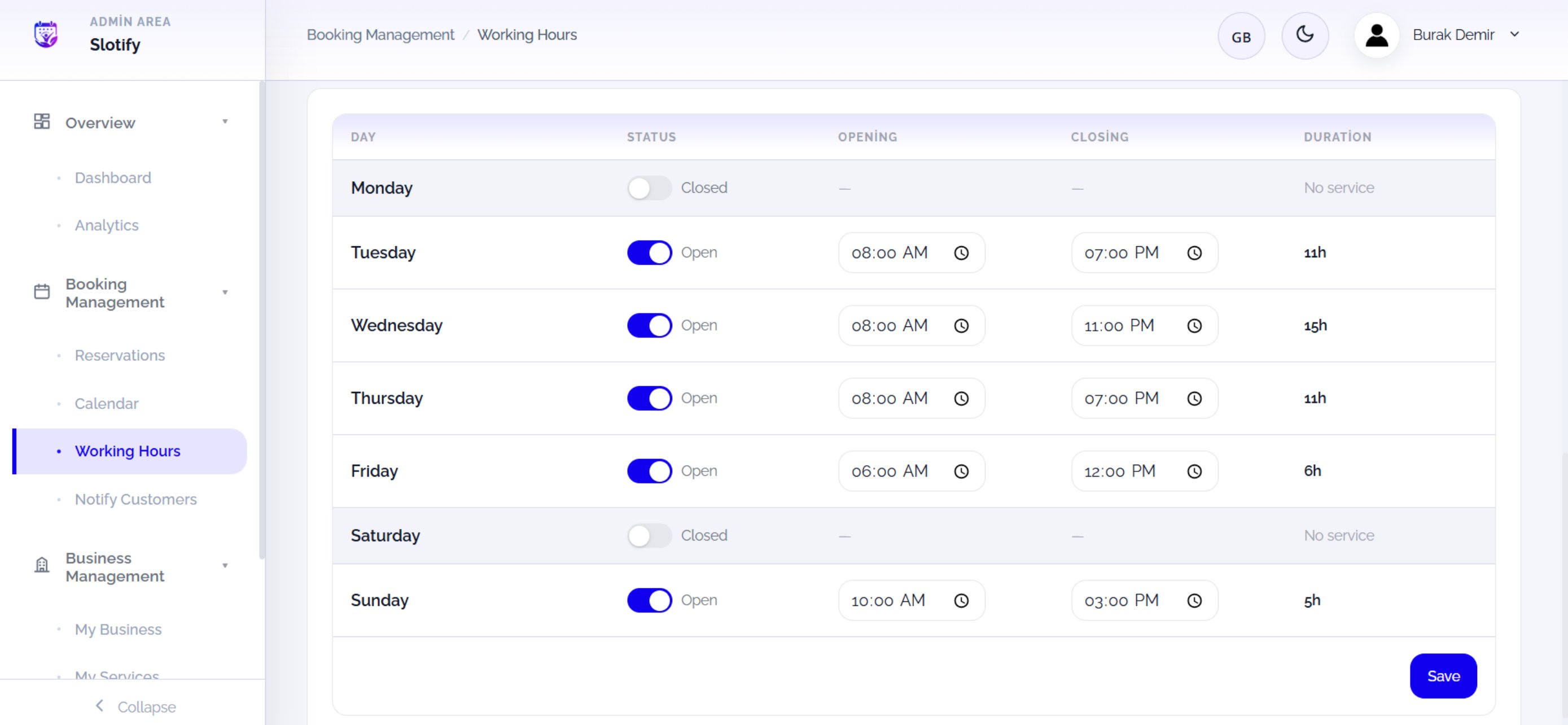
    One row per day: status switch, opening–closing times and the auto-computed duration.

    <div className="s-action">Click **Save** at the bottom right when done — you cannot take bookings until your hours are saved.</div>

    <Accordion title="🔎 Table columns">
      | Field / Element          | What it means                                                   |
      | ------------------------ | --------------------------------------------------------------- |
      | **Day**                  | Day of the week.                                                |
      | **Status (Open/Closed)** | Whether the day is bookable; **Closed** days show “No service”. |
      | **Opening / Closing**    | First and last bookable time (time pickers).                    |
      | **Duration**             | Auto-computed daily total (e.g. 11h).                           |
    </Accordion>
  </Step>

  <Step title="Reservation settings + summary cards">
    <Frame>
      <img src="https://mintcdn.com/codevestllc-5d6f3ede/YKrZiftlDEtllZar/images/web/5.png?fit=max&auto=format&n=YKrZiftlDEtllZar&q=85&s=93ff6a537d336e7f82cff8be3f51865f" alt="Reservation settings" width="2778" height="1284" data-path="images/web/5.png" />
    </Frame>

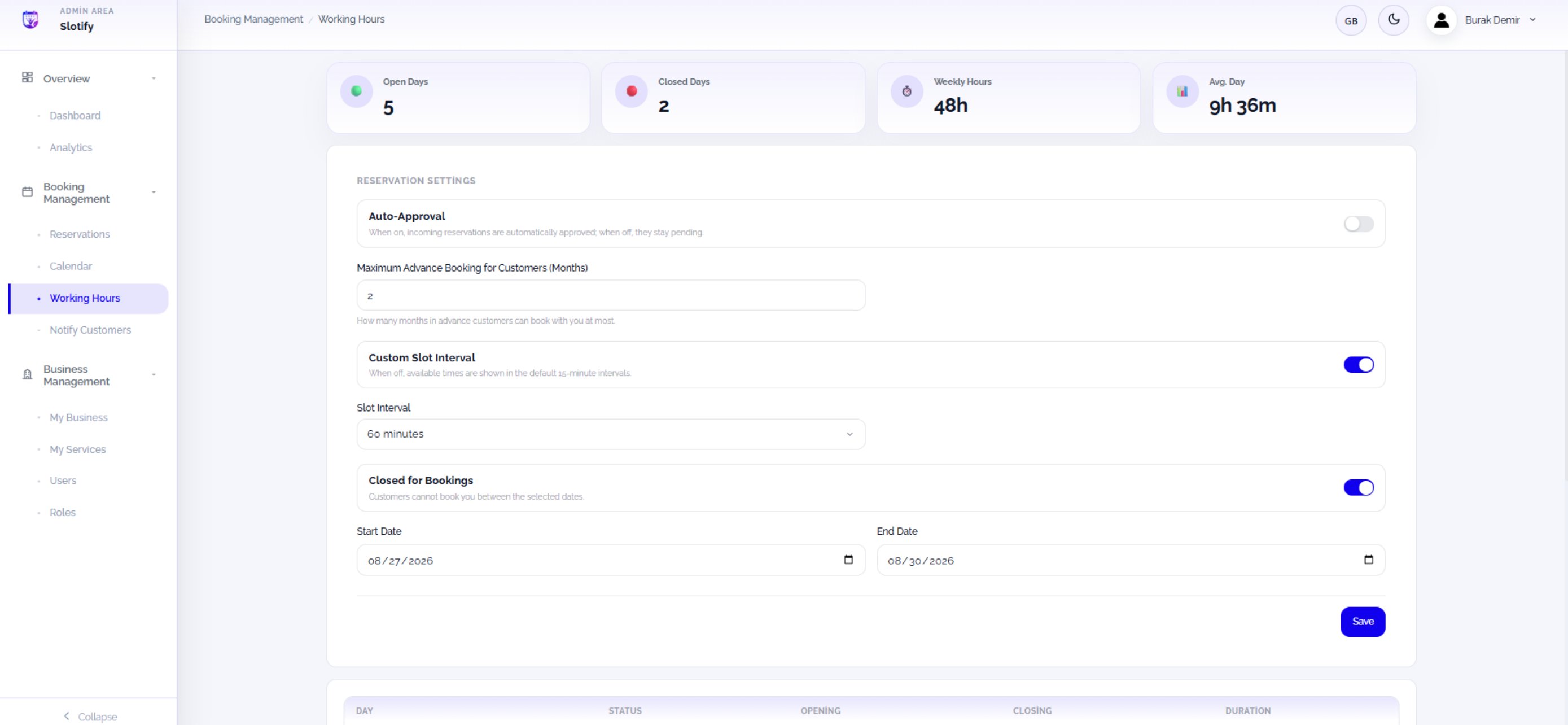
    The cards on top summarize your week: **Open Days**, **Closed Days**, **Weekly Hours**, **Avg. Day**. The booking rules sit below.

    <div className="s-action">Click this section’s own **Save** button after changing settings.</div>

    <Accordion title="🔎 What each setting means">
      | Field / Element                          | What it means                                                       |
      | ---------------------------------------- | ------------------------------------------------------------------- |
      | **Auto-Approval**                        | On: bookings confirm automatically. Off: they arrive **Pending**.   |
      | **Maximum Advance Booking (Months)**     | How many months ahead customers can book (e.g. 2).                  |
      | **Custom Slot Interval + Slot Interval** | Off: 15-minute slots. On: pick your own interval (e.g. 60 minutes). |
      | **Closed for Bookings + Start/End Date** | Customers cannot book between the dates — perfect for holidays.     |
    </Accordion>
  </Step>
</Steps>