> ## Documentation Index
> Fetch the complete documentation index at: https://documentation.slotify.com.tr/llms.txt
> Use this file to discover all available pages before exploring further.

# Hizmetlerim (My Services)

> Web’de hizmet tanımlama ve özel saatler

# <span className="s-hero">Hizmetlerim</span>

Hizmetlerinizi web panelinden yönetin; personel bazında filtreleyin.

<Info>🌐 **Adres:** [`https://admin.slotify.com.tr/services`](https://admin.slotify.com.tr/services) · 🧭 **Menü:** **Business Management → My Services**</Info>

<Steps>
  <Step title="Hizmet listesi">
    <Frame>
      <img src="https://mintcdn.com/codevestllc-5d6f3ede/YKrZiftlDEtllZar/images/web/17.png?fit=max&auto=format&n=YKrZiftlDEtllZar&q=85&s=fc797721fc82024c4dfc6b3b4fc4c714" alt="Hizmet listesi" width="2778" height="1284" data-path="images/web/17.png" />
    </Frame>

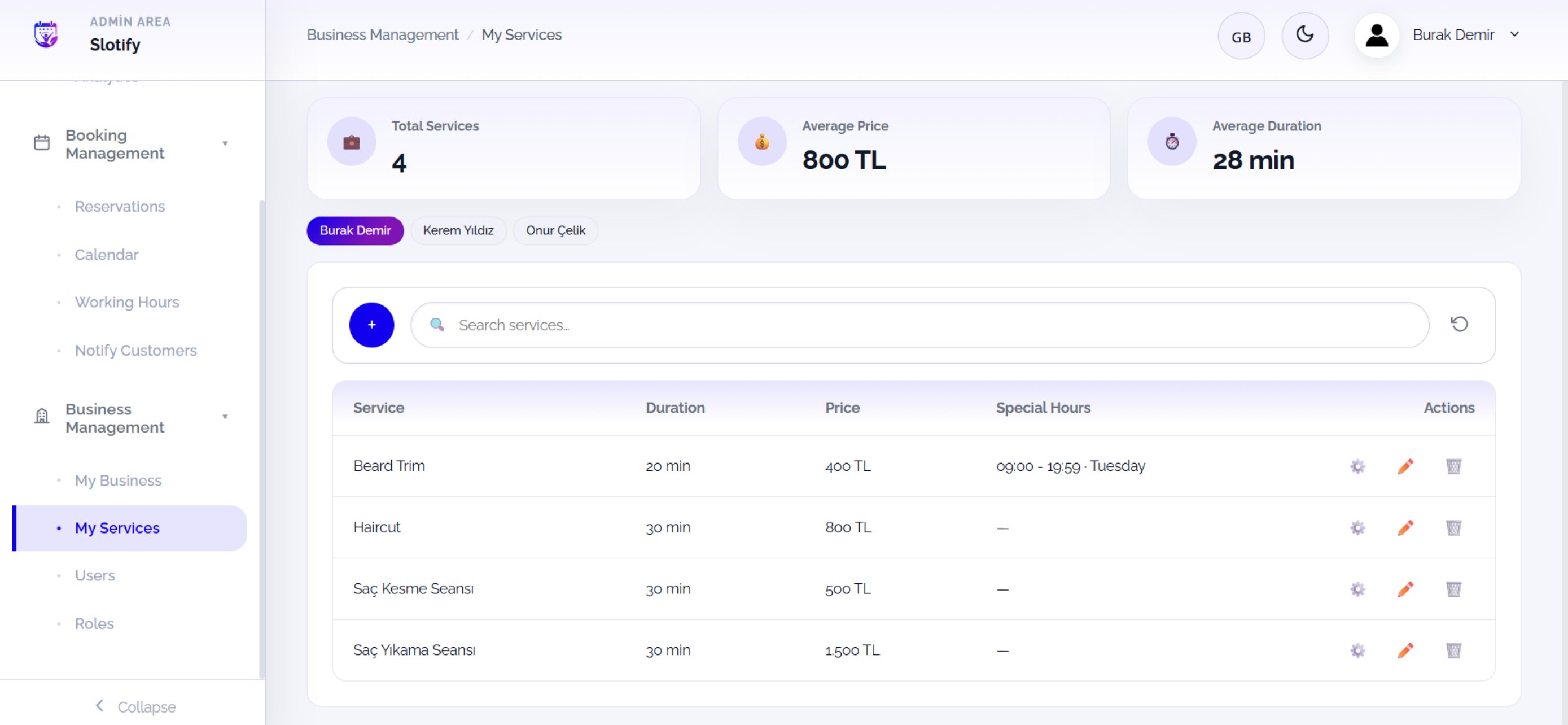
    Üstte özet kartlar (**Total Services**, **Average Price**, **Average Duration**) ve personel sekmeleri; tabloda her hizmetin süresi, ücreti ve özel saatleri.

    <div className="s-action">Yeni hizmet için **+** butonuna tıklayın; personel çiplerine tıklayarak o uzmanın hizmetlerini görün.</div>

    <Accordion title="🔎 Tablo ve aksiyonlar">
      | Alan / Öğe                     | Anlamı                                                                    |
      | ------------------------------ | ------------------------------------------------------------------------- |
      | **Service / Duration / Price** | Hizmetin adı, süresi ve ücreti.                                           |
      | **Special Hours**              | Tanımlıysa özel saat penceresi (örn. *09:00 – 19:59 · Tuesday*), yoksa —. |
      | **⚙️**                         | Özel çalışma saati penceresini açar.                                      |
      | **✏️ / 🗑**                    | Hizmeti düzenler / siler.                                                 |
    </Accordion>
  </Step>

  <Step title="Yeni hizmet">
    <Frame>
      <img src="https://mintcdn.com/codevestllc-5d6f3ede/YKrZiftlDEtllZar/images/web/15.png?fit=max&auto=format&n=YKrZiftlDEtllZar&q=85&s=61e4de027c613f4d85a93bc9e02659bc" alt="Yeni hizmet" width="2778" height="1284" data-path="images/web/15.png" />
    </Frame>

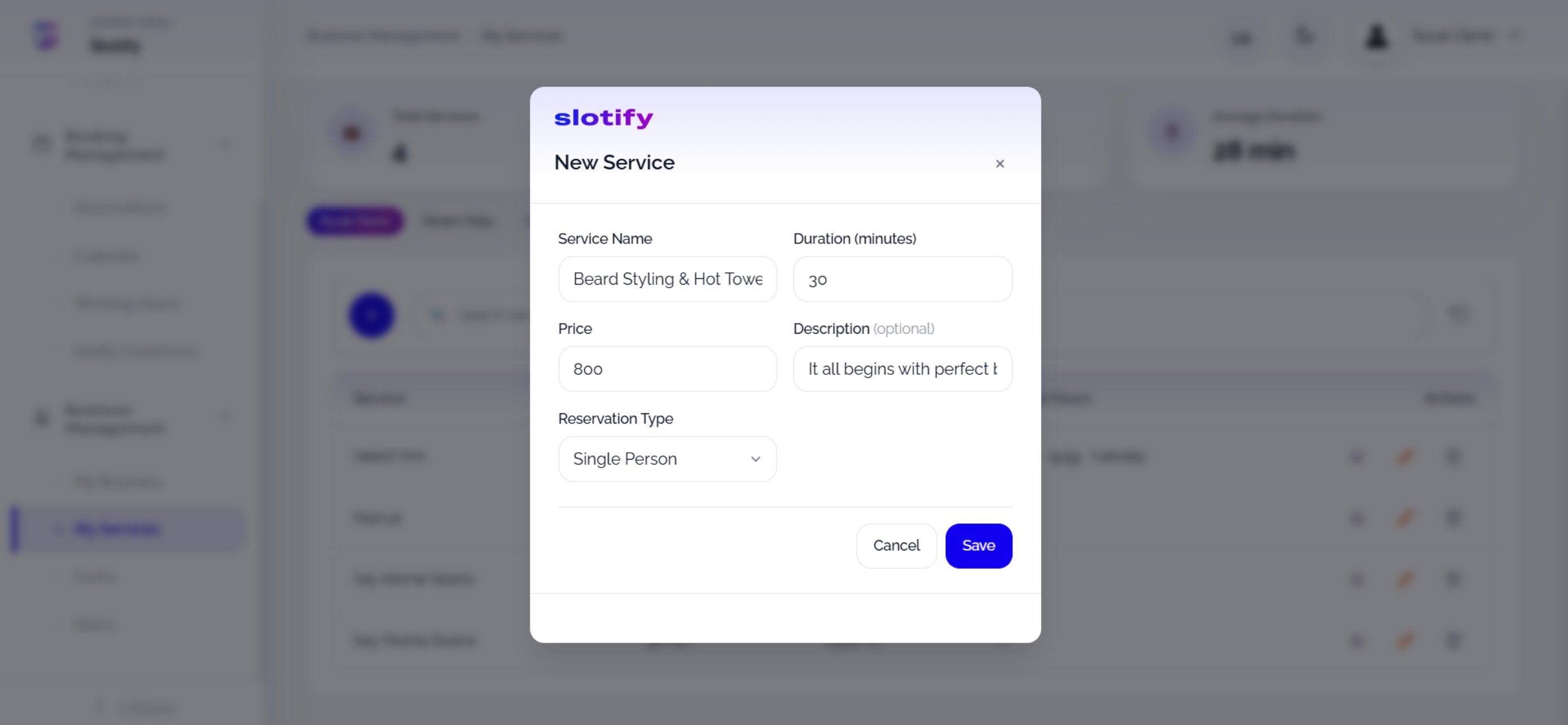
    **New Service** penceresini doldurun.

    <div className="s-action">Alanları doldurup **Save** butonuna tıklayın.</div>

    <Accordion title="🔎 Formdaki her alan">
      | Alan / Öğe                 | Anlamı                                                                                                                                                                                         |
      | -------------------------- | ---------------------------------------------------------------------------------------------------------------------------------------------------------------------------------------------- |
      | **Service Name**           | Hizmetin adı (örn. *Beard Styling & Hot Towel*).                                                                                                                                               |
      | **Duration (minutes)**     | Süre — slot hesabı buna göre yapılır.                                                                                                                                                          |
      | **Price**                  | Ücret (₺).                                                                                                                                                                                     |
      | **Description (optional)** | Müşterinin göreceği kısa açıklama.                                                                                                                                                             |
      | **Reservation Type**       | **Single Person**: bir saate tek müşteri. **Session (Group)**: aynı saate kontenjan kadar müşteri (pilates dersi gibi); seçince kapasite alanı açılır ve saat ancak kontenjan dolunca kapanır. |
    </Accordion>
  </Step>

  <Step title="Özel çalışma saatleri">
    <Frame>
      <img src="https://mintcdn.com/codevestllc-5d6f3ede/YKrZiftlDEtllZar/images/web/16.png?fit=max&auto=format&n=YKrZiftlDEtllZar&q=85&s=bb8062bd332879310c088e82de5ce5ed" alt="Özel çalışma saatleri" width="2778" height="1284" data-path="images/web/16.png" />
    </Frame>

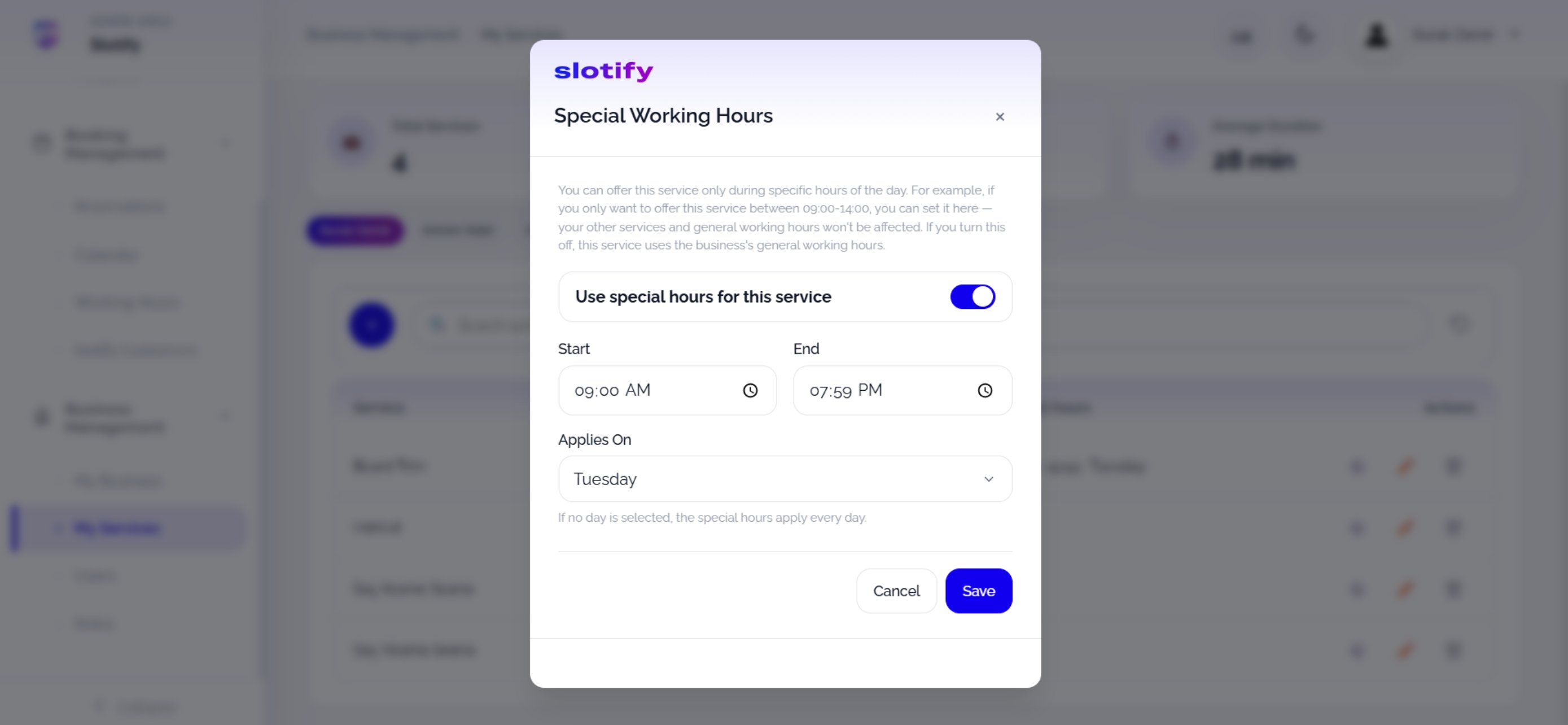
    Hizmet satırındaki ⚙️ ikonu bu pencereyi açar.

    <div className="s-action">**Use special hours for this service** anahtarını açın, saat aralığını ve günü seçip **Save** butonuna tıklayın.</div>

    <Accordion title="🔎 Özel saat kuralları">
      | Alan / Öğe                             | Anlamı                                                                                                   |
      | -------------------------------------- | -------------------------------------------------------------------------------------------------------- |
      | **Use special hours for this service** | Açıkken hizmet yalnızca bu pencerede randevuya açılır; kapatırsanız genel çalışma saatleri geçerli olur. |
      | **Start / End**                        | Hizmete özel saat aralığı — diğer hizmetler ve genel saatler etkilenmez.                                 |
      | **Applies On**                         | Pencerenin geçerli olduğu gün; **gün seçilmezse her gün** uygulanır.                                     |
    </Accordion>
  </Step>
</Steps>
